Why Robotics?
Robotics in education has been increasing and evolving largely over the recent years decade. Robotics in education combines coding and computational thinking to solve problems, develop higher-order thinking, and acquire 21st-century competencies. Robotics has been mainly integrated into maths, science and technology classrooms, but can benefit education at all levels and subjects’ areas (Alimisis, 2012).
.
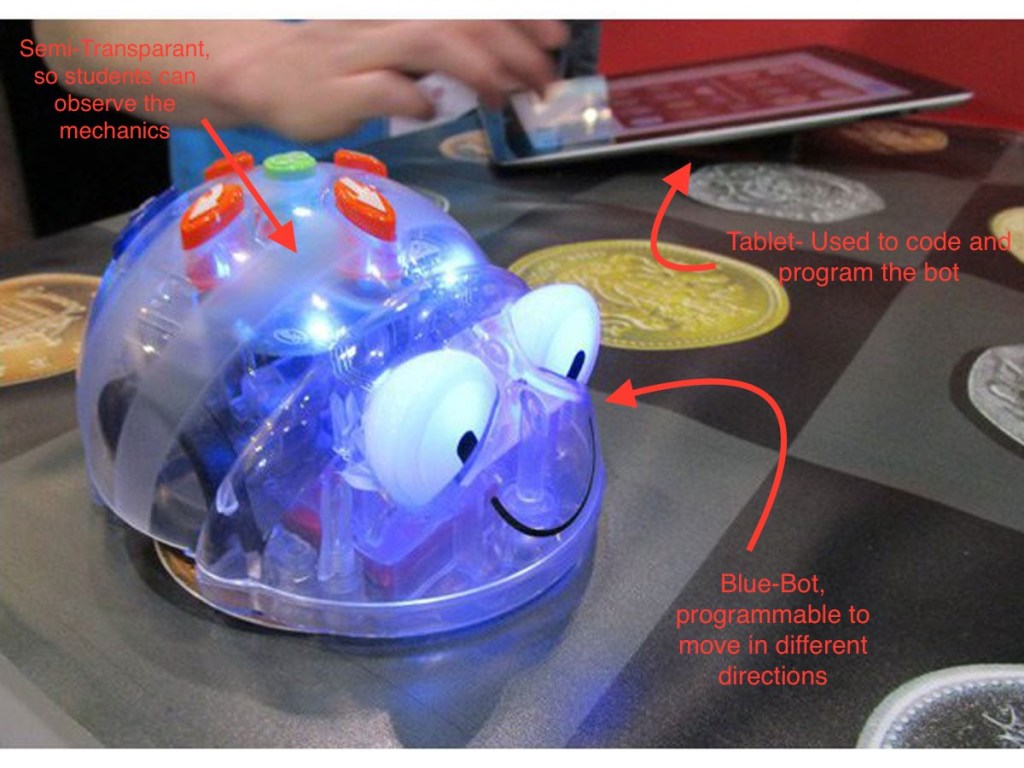
Blue – bots are a robotics tool designed for lower primary students, which works as an engaging and simple introduction to coding and robotics. Blue – bots works on developing students programming skills and directional language use. The blue – bot is controlled using a tablet or iPad, whereby students create their program for their blue- bot to follow. The blue – bot then drives around following the program. Students develop logical and sequential thinking whilst programming their blue bot. The blue bot is highly engaging and motivating for students as they are able to see the physical result of their programming, rather than simply on a screen.
How can Robotics foster creativity?
Using the blue – bot in the classroom fosters creativity in students as they are given control and ownership of their learning, whilst it also encourages creative problem solving (Alimisis, 2012). Students can begin simple and have immediate success and then begin to explore the possibilities of more complex programs and obstacles for the blue bot to overcome. Students are restricted to the forwards, backward and turning movements of the blue – bot, but have free choice in the way it is programmed.
In comparison, the Ozobot Evo is another programming device designed to develop students programming and coding skills. Similar to the blue – bot, the Ozobot Evo can be programmed on a mobile app to follow a path and move around. Alternatively, the Ozobot Evo can be programmed without the use of technology as it can follow coloured lines on white paper, where different colour combinations give the robot specific directions. The Ozobot can also be used collaboratively with other Ozobot devices to play interactive games.
The verdict?
There are many options available to implement effective robotics education into the classroom. Both blue – bot and Ozobot Evo are designed to make robotics accessible to lower primary students and create engaging and creative learning experiences. Although both technologies are relatively similar, the Ozobot takes programming one step further, by developing simple programming devices into collaborative games which may make it slightly more interesting and engaging for the students.
References:
Alimisis, Dimitris (2012). Robotics in Education & Education in Robotics: Shifting Focus from Technology to Pedagogy. Robotics in Education Conference, 2012.
 Educ3620 Digital Creativity and Learning
Hi Saskia,
I like how you touched on the importance that robotics brings to education like computational thinking, etc. It’s great that this is discussed as it is sometimes not recognised by all educators. I like that you describe what a blue-bot is and how it can be used by students. Although there are some aspects of creativity that can be shown when using robotics I still wonder whether creativity is sometimes impacted and hindered by some types of robotics like the blue-bot as it solely used for movement purposes. I loved that you compared different types of robotics it shows that you have a great understanding of their potential for the classroom and how they can benefit students learning.
LikeLike
Hi Brianna, thanks for your comment. I agree, using roboitics where the sole purpose is movement, limits students’ creative opportunities. I think the Blue – Bot is a good starting point to introduce younger students to robotics and programming. Thanks again for your feedback.
LikeLike